
Manage your plan on the Billing page
Terakhir diperbarui
Everything about your plan is in the account menu → Plan & billing (/app/account/billing). Only the workspace owner can buy or change a plan.
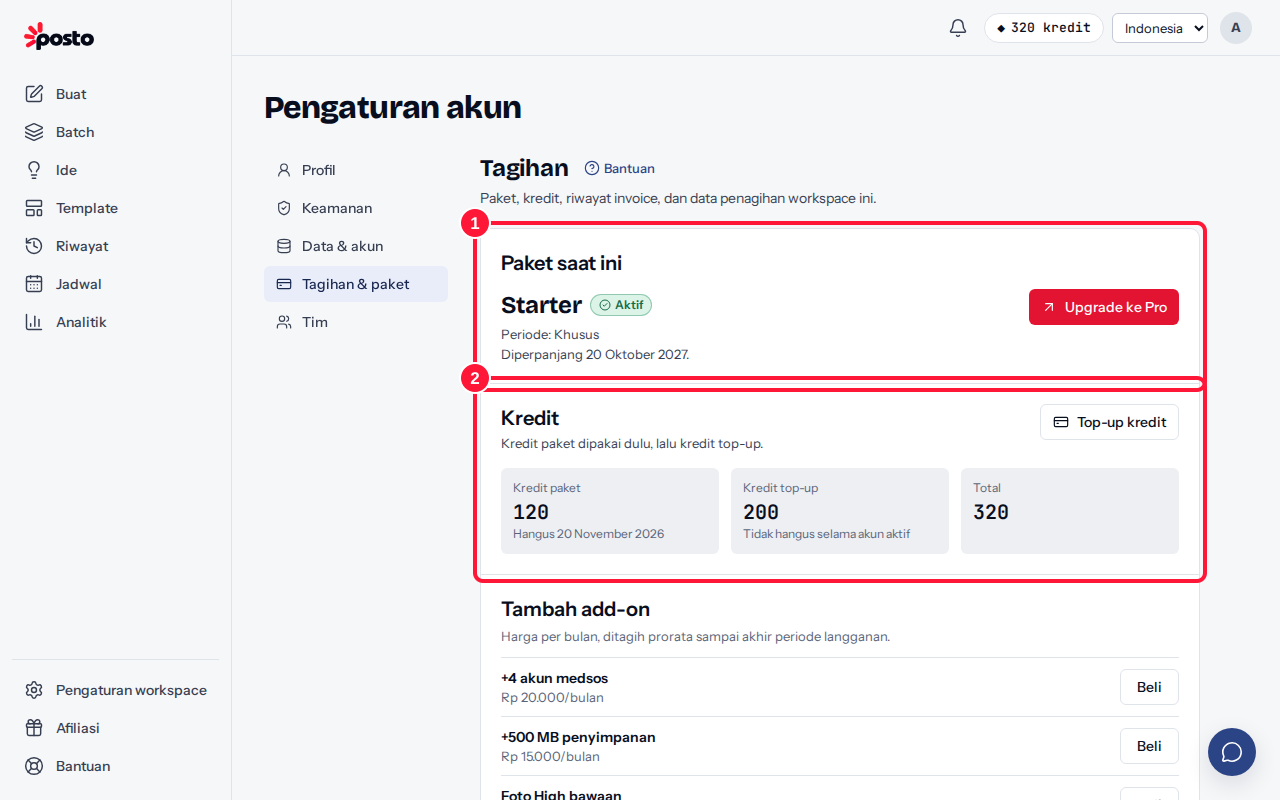
- Current plan — the plan name, status, period, and the "Renews on …" or "Ends on …" date. From here you can Upgrade, Change plan or period, or Cancel subscription.
- AI credits — your remaining plan AI credits, top-up AI credits, and the total, plus the Top up AI credits button.
- Invoice history — all invoices with Pay/Continue payment and Download PDF buttons.
- Billing details — company name, tax ID (NPWP), and address for invoices.
What does the plan status mean?
| Status | Meaning |
|---|---|
| Active | The plan is running normally |
| Ends at period end | The subscription is canceled; the plan stays active until its end date |
| Past due | The plan has ended and the renewal invoice hasn't been paid; scheduling, posting, exports, and the studio keep running for 1 day (AI actions use top-up AI credits) |
| Grace period | Features are limited until the invoice is paid (special settings only) |
| Locked | The plan is locked because the invoice wasn't paid (only if the Free plan isn't available) |
| Ended | The plan has finished |
Full details: Renewals & reminders, When your plan ends: paused posts, Cancel or downgrade your plan, Invoices & tax ID (NPWP).
Still stuck? Contact [email protected].
Apakah artikel ini membantu?
Artikel terkait
Belum ketemu jawabannya?
Tim support siap membantu. Sebutkan judul carousel atau jam kejadian supaya kami cepat menemukannya.