
Pay with QRIS
Terakhir diperbarui
QRIS can be paid from any bank or e-wallet app with the QRIS logo, including GoPay, OVO, DANA, ShopeePay, LinkAja, BCA mobile, Livin' by Mandiri, BRImo, and wondr by BNI.
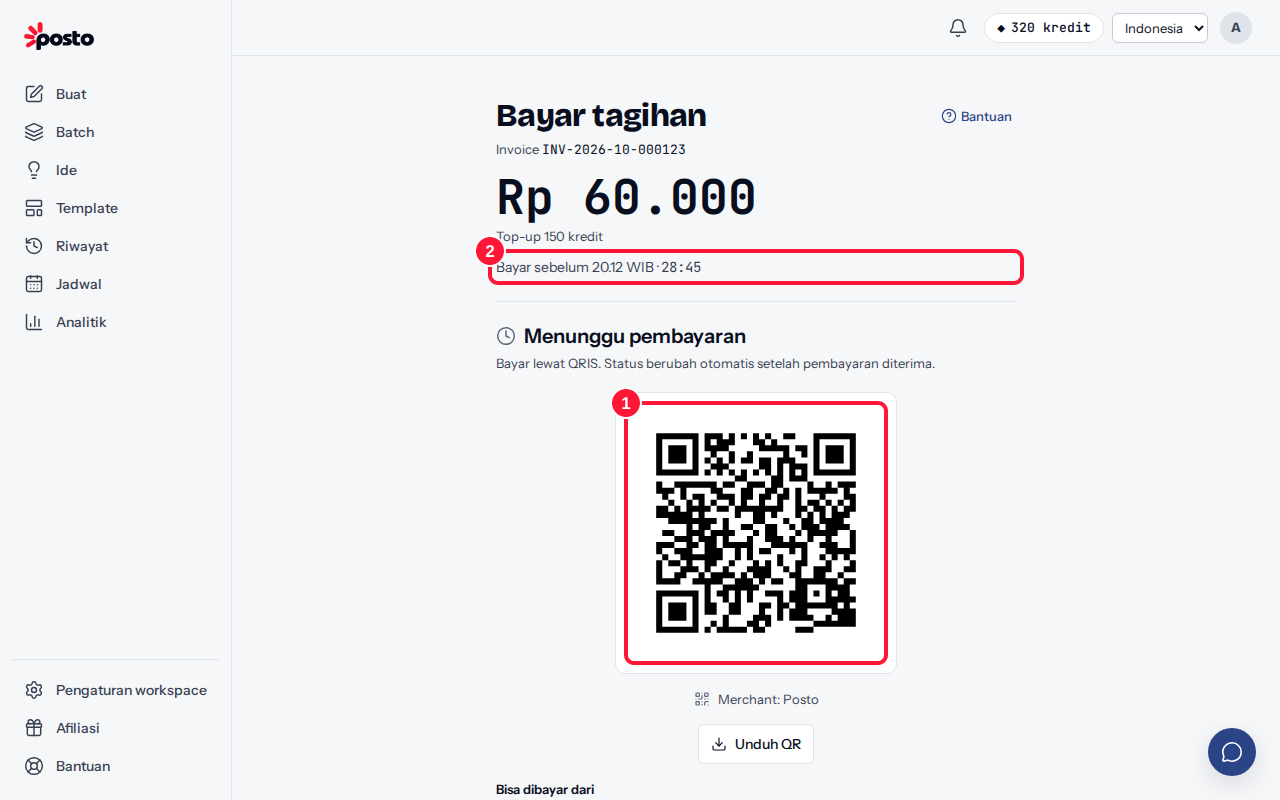
- On the Payment summary, choose QRIS (marked "Recommended" on a computer), then click Pay {amount}. The Pay invoice page shows a QR code.
- Note the deadline ("Pay before … WIB"). QRIS codes are currently valid for 30 minutes.
- Open your bank or e-wallet app, choose the QRIS scan/pay menu, then point the camera at the QR code.
- Check the merchant name and amount, then confirm the payment in the app.
- Wait a moment. The status in Posto changes to Payment received on its own — no need to reload the page.
Paying from the same phone?
- Click Download QR to save the QR image.
- Open your bank or e-wallet app, choose scan, then pick the QR image from your gallery.
Closed the page before paying?
No problem. Open it again from the account menu → Plan & billing → Invoice history and click Continue payment. The same code stays valid until its deadline.
Paid but the status hasn't changed? See Payment not confirmed yet.
Still stuck? Contact [email protected].
Apakah artikel ini membantu?
Artikel terkait
Belum ketemu jawabannya?
Tim support siap membantu. Sebutkan judul carousel atau jam kejadian supaya kami cepat menemukannya.