
Payment not confirmed yet
Terakhir diperbarui
Di artikel ini
The status on the payment page updates automatically from the payment server. It usually takes a few seconds, sometimes a few minutes for a Virtual Account.
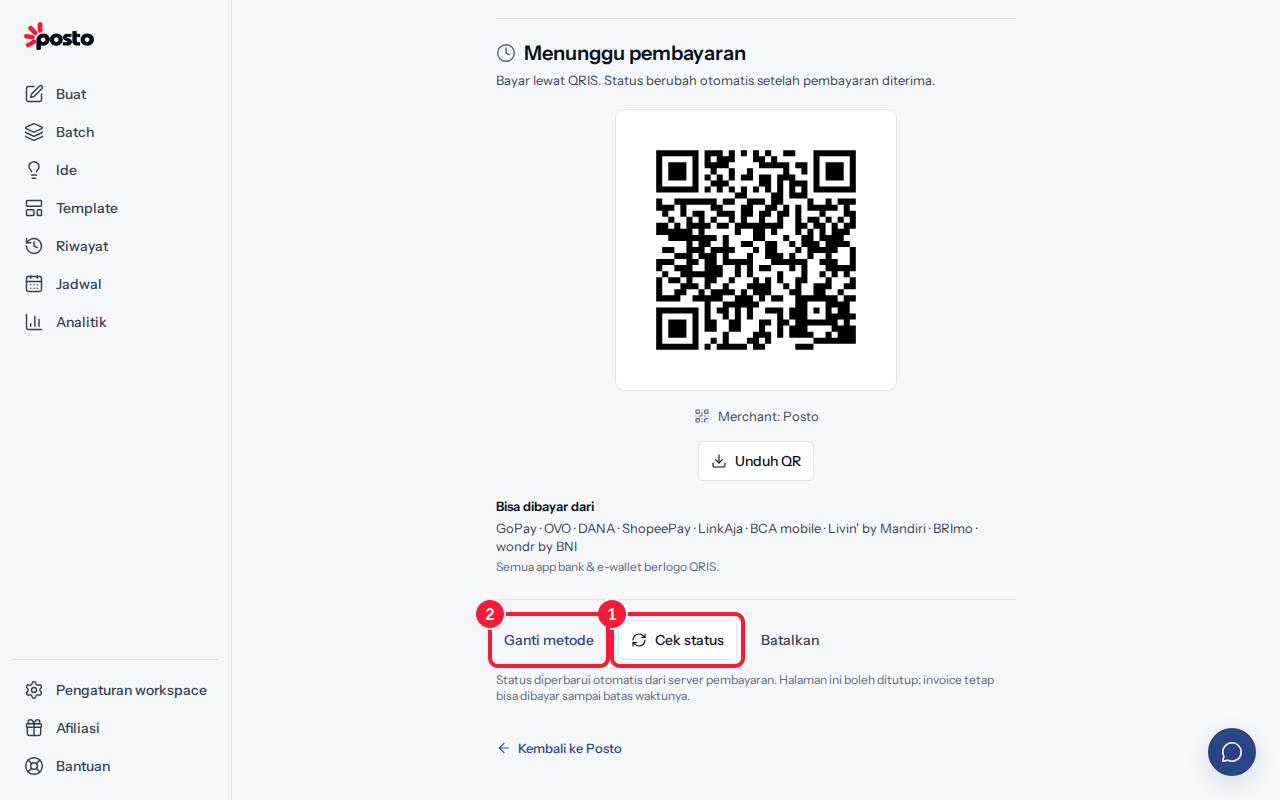
Paid, but the status still says "Waiting for payment"?
- Wait a moment, then click Check status (it appears 30 seconds after the page opens). If you see "No payment has come in yet", wait and check again.
- Want to pay another way? Click Change method, choose a method, then Use this method. The old code stops working automatically.
- Still no change after 15 minutes even though the money has left your account? Email support with the invoice number (shown on the payment page) and your proof of payment, and we'll help match it.
You can close the payment page. You can still pay the invoice until its deadline from the account menu → Plan & billing → Invoice history → Continue payment.
Payment code expired?
The page shows Payment code expired. That code can't be used again — don't transfer to the old VA number or QR code.
- Click Create a new payment code for the same invoice, or Try another method.
- Pay with the new code before its deadline.
Invoices from the checkout page can be paid for 24 hours. After that, the button changes to Create a new invoice and you can order again from the Pricing page.
Payment failed?
"Payment failed" means no money was taken. Try again with another method.
Paid twice by mistake? See Paid twice by mistake.
Still stuck? Contact [email protected].
Apakah artikel ini membantu?
Artikel terkait
Belum ketemu jawabannya?
Tim support siap membantu. Sebutkan judul carousel atau jam kejadian supaya kami cepat menemukannya.