
Pay with a Virtual Account
Terakhir diperbarui
Di artikel ini
A Virtual Account (VA) is a dedicated destination account number for a single invoice. Banks currently available: BCA, BNI, BRI, Mandiri, Permata, CIMB Niaga, and BSI.
Virtual Account only appears for invoices from Rp 80,000 (current limit). For smaller invoices, pay with QRIS — always available — or an e-wallet.
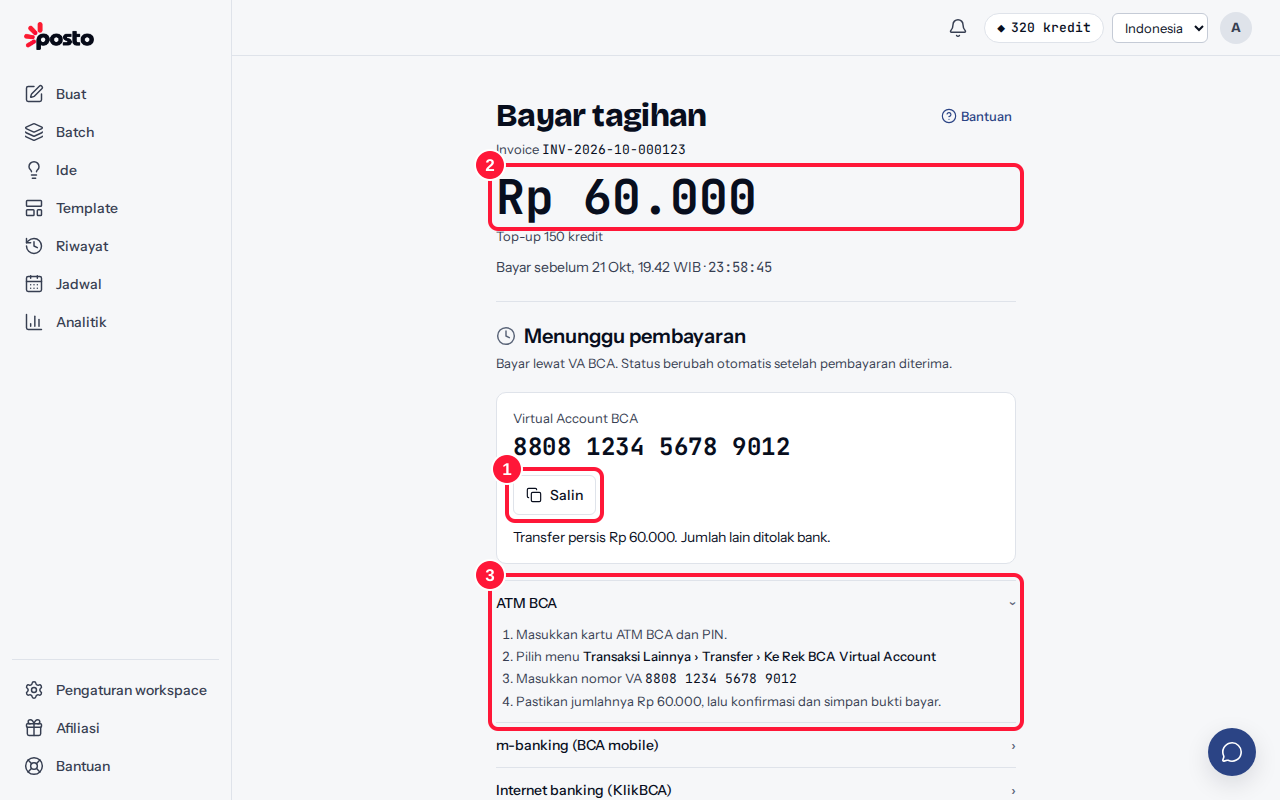
- On the Payment summary, choose VA {bank}, then click Pay {amount}. Click Copy to copy the Virtual Account number.
- Transfer exactly the total shown. The bank rejects any other amount.
- Follow the guide on the payment page: ATM, Mobile banking, or Internet banking. Choose the menu, enter the VA number, make sure the amount matches, then confirm and keep your receipt.
- The status in Posto changes automatically to Payment received once the bank passes the payment on (usually within a few seconds to a few minutes).
VA numbers are currently valid for 24 hours. Each number can be paid only once.
Notes per bank
| Bank | Mobile banking | Menu |
|---|---|---|
| BCA | BCA mobile | m-Transfer › BCA Virtual Account |
| BNI | BNI Mobile Banking | Transfer › Virtual Account Billing |
| BRI | BRImo | BRIVA |
| Mandiri | Livin' by Mandiri | Bayar › Virtual Account |
| Permata | PermataMobile X | Bayar Tagihan › Virtual Account |
| CIMB Niaga | OCTO Mobile | Transfer › Virtual Account |
| BSI | BSI Mobile | Bayar › Virtual Account |
Menu names may differ slightly in your bank's app or ATM version. Transferring from another bank? Use your banking app's transfer-to-Virtual-Account menu for the destination bank, if it has one.
Transferred to an old number?
After a payment succeeds or the code is replaced, the old VA number is canceled. Don't transfer to an old number; always use the number shown on the latest payment page. If you already did, see Paid twice by mistake.
Still stuck? Contact [email protected].
Apakah artikel ini membantu?
Artikel terkait
Belum ketemu jawabannya?
Tim support siap membantu. Sebutkan judul carousel atau jam kejadian supaya kami cepat menemukannya.