
Top up AI credits
Terakhir diperbarui
Di artikel ini
Ran out of AI credits before next month's allowance arrives? Add more with a top-up. Top-ups are available on paid plans and can only be bought by the workspace owner. On the Free plan, upgrade first on the Pricing page.
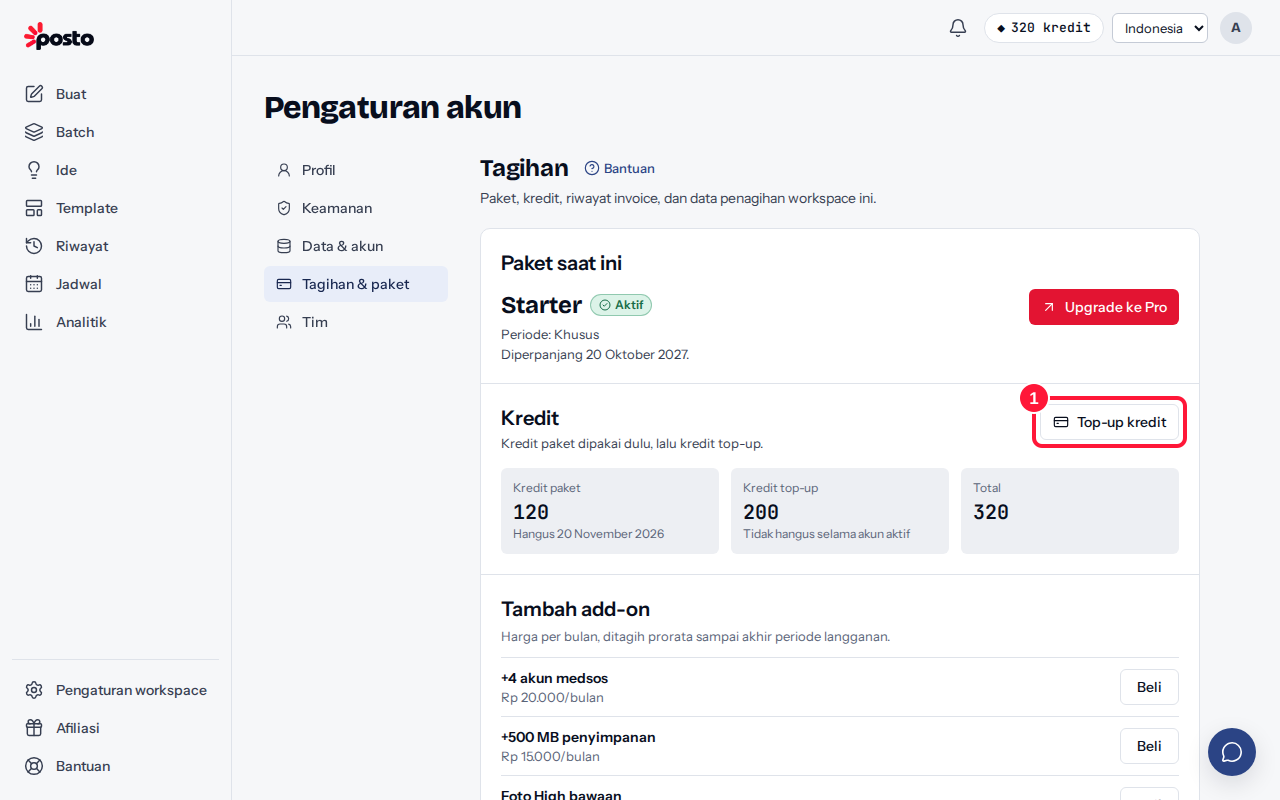
How to top up
- Open the account menu → Plan & billing, then click Top up AI credits in the AI credits section. When your balance drops below 10 AI credits, an Add button also appears next to your AI credit balance in the left menu.
- The Upgrade page opens on the AI credits tab. Pick a top-up pack (currently Rp 50 per AI credit); the Summary shows your current balance and the balance after.
- In the Summary, choose QRIS, an e-wallet, or a Virtual Account (for invoices from Rp 80,000), then click Pay {amount}.
- AI credits are added automatically once the payment is received. The payment page shows "+{n} AI credits added to your balance".
Do top-up AI credits expire?
No. Top-up AI credits don't expire and are only used after your plan AI credits run out. See Plan AI credits and top-up AI credits.
Still stuck? Contact [email protected].
Apakah artikel ini membantu?
Artikel terkait
Belum ketemu jawabannya?
Tim support siap membantu. Sebutkan judul carousel atau jam kejadian supaya kami cepat menemukannya.