
Exporting your account data
Terakhir diperbarui
Download a copy of all your data in one ZIP file: profile, workspaces, brand kit, carousels (JSON + slide PNGs), schedules, social accounts (no tokens), AI credit history, invoices, and payments.
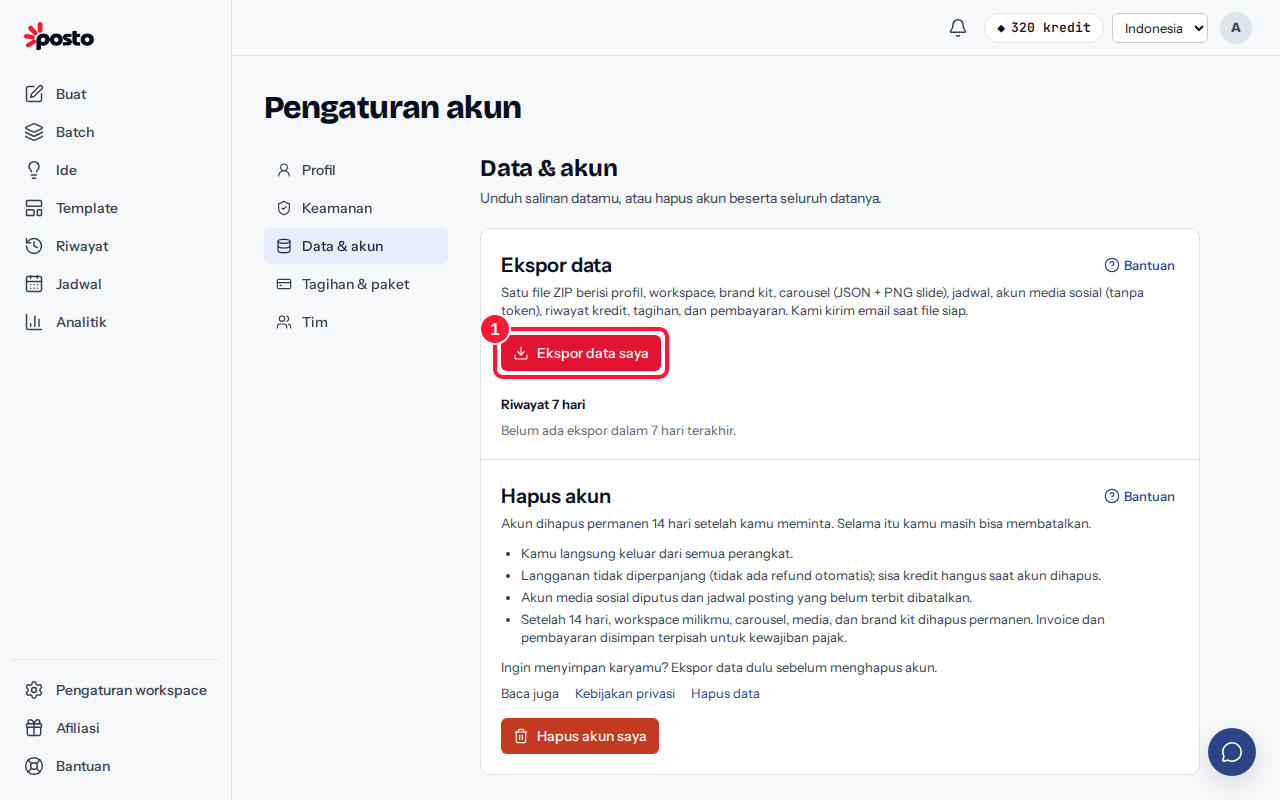
- Go to the account menu → Profile & security → Data & account and click Export my data.
- Wait for an email from Posto. The status shows on the same page: Queued, Preparing, then Ready to download.
- Click Download in the email or on the Data & account page.
How long is the file available?
The file is kept for 24 hours. After that its status changes to Expired; request a new export if you need one. You can request an export once every 24 hours.
Some carousels are only included as JSON?
If the archive is too large, some carousels are only included as JSON. The README file inside the ZIP explains why.
Still stuck? Contact [email protected].
Apakah artikel ini membantu?
Artikel terkait
Belum ketemu jawabannya?
Tim support siap membantu. Sebutkan judul carousel atau jam kejadian supaya kami cepat menemukannya.