
Connecting social media accounts
Terakhir diperbarui
Connect your accounts so carousels can be scheduled and published automatically. Only the workspace owner or an admin can connect and disconnect accounts.
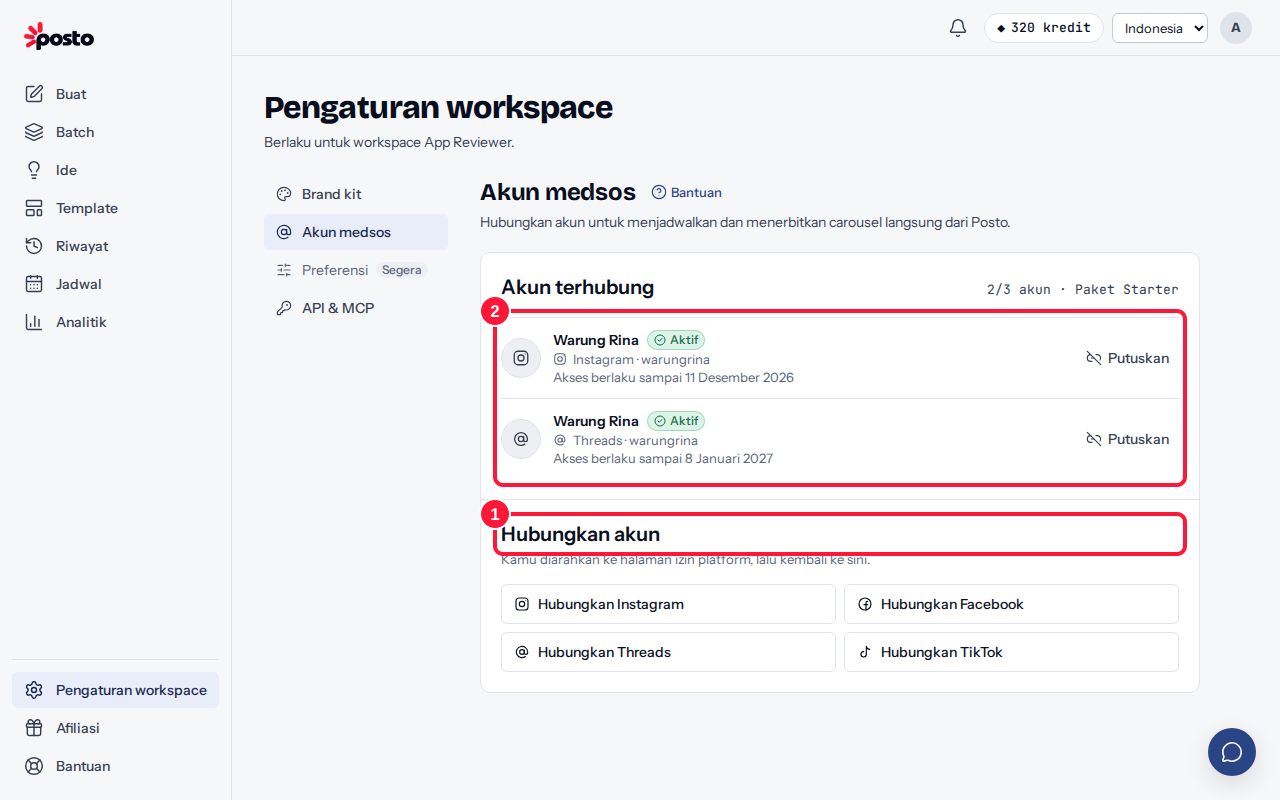
- Open Brand & social accounts → Social accounts (/app/settings/social), then click Connect {platform} under Connect an account.
- You're taken to the platform's permission page. Log in and approve all requested permissions, and you'll return to Posto. The account appears under Connected accounts with the status Active.
The number of accounts depends on your plan (Free: 1 account). If you've hit the limit, disconnect another account or upgrade your plan.
You need an Instagram professional account (business or creator). You can switch a personal account to a professional one for free in the Instagram app settings.
You connect a Page, not a personal profile.
- Click Connect Facebook and approve the permissions. Tick the Pages you want to connect while granting permission.
- In Choose Facebook Pages, select one or more Pages, then click Connect selected Pages.
Each Page uses one account slot. Only Pages you manage as an admin or editor appear.
Threads
Click Connect Threads, log in to your Threads account, then approve the permissions.
TikTok
Paid plans only. See TikTok on paid plans.
What does the account status mean?
| Status | Meaning | What to do |
|---|---|---|
| Active | Ready to use | — |
| Expiring soon | Access from the platform is about to end | Click Refresh access |
| Expired | Access has ended | Click Reconnect |
| Revoked | Permission was revoked on the platform | Click Reconnect |
| Needs attention | The platform rejected access | Click Reconnect |
Posto refreshes access automatically when it can, and lets you know a few days before it runs out. The Disconnect button removes the account; scheduled posts to that account will fail until it's connected again.
Still stuck? Contact [email protected].
Apakah artikel ini membantu?
Artikel terkait
Belum ketemu jawabannya?
Tim support siap membantu. Sebutkan judul carousel atau jam kejadian supaya kami cepat menemukannya.